¶ How to create a mailing List
This guide explains how to create a new mailing list using the May First control panel.
See more about mailing lists at May First for a general overview.
¶ Open the control panel
Go to the May First control panel and sign in.
If Email List does not appear in the left hand menu, see Control panel permissions.
¶ Create a new mailing list
Your mailing list address will be formed from the combination of the name and domain, for example: community@lists.mayfirst.org
-
Click Email List in the left-hand menu.
-
Click Add a new item.
-
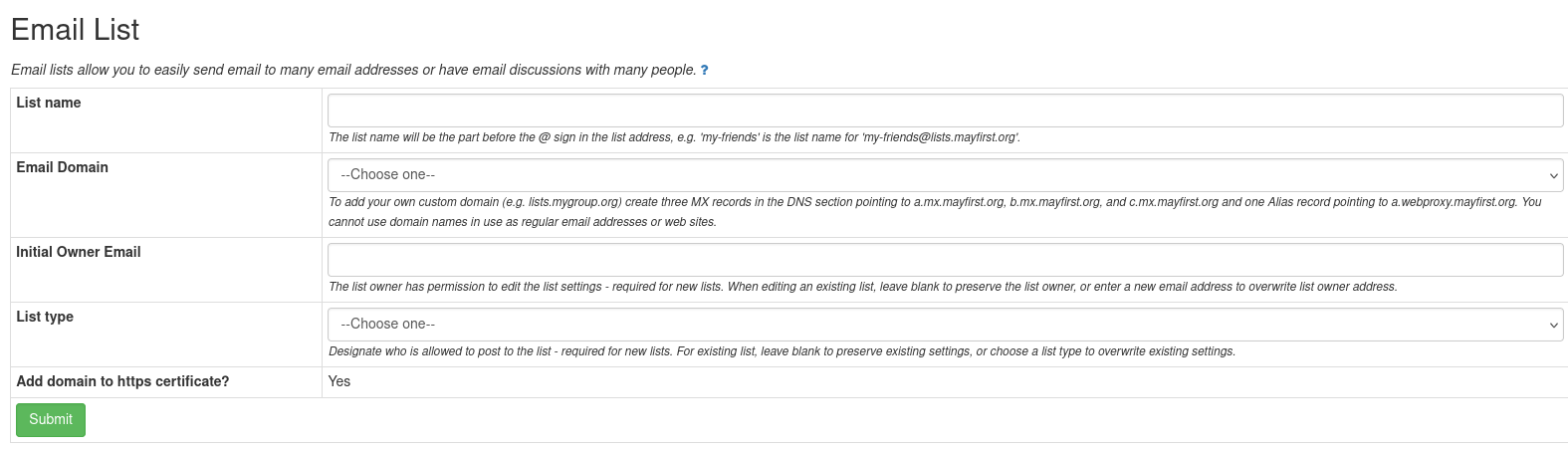
Enter the following details:
-
List name (e.g.
community) -
Email domain (e.g.
lists.mayfirst.org) -
Inital Owner Email (Your email address)
-
List type learn more:
- Discussion list or
- Announcement list
-
-
Click Submit.
¶ Confirm creation
After submitting the form:
- You will receive an email confirming the new mailing list.
- Follow the link in the email to open the mailing list web interface.
- Log in to complete initial setup.
To learn how login and access works, see How to access the mailing list web interface.
¶ Use your own domain name (optional)
To create a mailing list using your own domain (for example, lists.example.org), you must first configure DNS records for the list subdomain in the May First control panel. If you are using an external DNS provider you'll need to follow additional notes.
Your domain will not appear under the Email Domain pulldown menu in the list creation interface until the required records have been created in the May First control panel.
¶ Create MX records
Create the following MX records for your list subdomain:
| DNS Type | Fully Qualified Domain Name | Server Name | Distance |
|---|---|---|---|
| MX | lists.example.org |
a.mx.mayfirst.org |
10 |
| MX | lists.example.org |
b.mx.mayfirst.org |
20 |
| MX | lists.example.org |
c.mx.mayfirst.org |
30 |
If you use an external DNS provider, also see How to create MX records for email.
¶ Create an ALIAS record
Create the following ALIAS record:
| DNS Type | Fully Qualified Domain Name | Server Name |
|---|---|---|
| ALIAS | lists.example.org |
b.webproxy.mayfirst.org |
This record is required so the mailing list web interface works from your custom domain.
If you use an external DNS provider, also see How to configure DNS records for a website
¶ Configure SPF, DKIM, and DMARC
Configure email authentication records for the list domain to improve mail delivery.
¶ Access your new list
After creation, you can manage the list through the web interface:
- Open the link from the confirmation email.
- Sign in using your Mailman account.
- Select the list from Mailing Lists page.
To learn how this interface works, see How to access the mailing list web interface.
¶ Send a test message
After your mailing list has at least one subscriber, send a test message to its address, for example:
community@lists.mayfirst.org
Depending on the list configuration, the message may be delivered immediately or held for moderation.
Learn more about mailing list behavior in About mailing lists at May First.